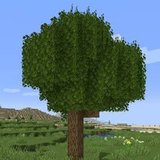

Better Foliage Cherry Landscapes: Build Balanced Blossom Gardens
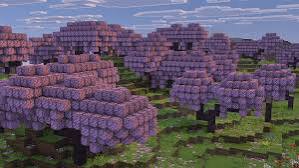
A Better Foliage cherry landscape is a design goal, not proof that the original mod adds a cherry biome. The reference image shows blossom-colored canopies, but the game version, resource pack or another vegetation mod may supply those trees. Identify your tree source first, then use foliage and layout to refine the garden.
Confirm where the blossom trees come from
Separate the tree from its visual treatment
Check whether your cherry blocks belong to your game version or to a separate mod. Then test how your foliage setup handles those specific leaves. An effect working on ordinary oak leaves does not automatically confirm support for a different block.
Create a small display with a log and a leaf block before planting a grove. This makes missing models, unwanted colors and texture conflicts easier to see.
Balance pink canopies with quieter colors
Use green ground cover and restrained path materials to support the blossom color. If every surface is equally bright, individual trees stop standing out. Keep a few areas of plain grass or stone where the eye can rest.
Limit competing accents
Choose one additional flower color for the main garden rather than filling it with every available bloom. Repeat that accent near the entrance and destination so it feels intentional. A small palette can still contain variation in height and shape.
Build a grove with open views
Place trees in uneven groups and leave a clear route between them. Vary the apparent size of neighboring crowns. Check that blossom branches frame the destination rather than hide it.
Avoid a continuous canopy ceiling
Leave gaps above important paths and seating areas. Open sky creates contrast against pink leaves and improves the sense of separate tree shapes. It also gives you more options when choosing a screenshot angle.
Use particles carefully where available
If your installed project provides suitable leaf particles, test them in the small display first. Do not confuse shader movement with falling particles or expect placed petals to appear automatically. Keep motion subtle near the garden's central viewpoint so it supports the setting.
Check lighting without changing the palette
Pink leaves can look washed out under strong exposure or overly saturated under a shader preset. Compare a neutral view with your usual lighting. Fix the underlying texture mismatch before using shader adjustments to compensate for it.
Keep a shader-free reference
Save one image without shaders. It helps you judge whether a later visual change comes from the foliage, the resource pack or the lighting. That comparison is particularly useful when the same garden looks different after an update.
Finish the garden around a focal point
Use a bridge, small pavilion or open bench area as the destination. Keep lower plants near the path and taller trees behind it. Walk the route in both directions and remove branches that interrupt the view. A balanced blossom garden feels coherent because its color, spacing and movement all serve the same composition.