
Better Foliage Forest Builds: Design Paths, Clearings and Canopies
Better Foliage forest builds work best when detail supports a planned landscape. A dense wall of leaves can look impressive from a distance while becoming difficult to navigate at ground level. Start with routes and clearings, then use foliage to strengthen the forest's shape.
Give the forest a simple structure
Pick a destination and a route
Choose a cabin, pond, lookout or entrance as the destination. Sketch a route toward it using temporary blocks. Decide where the path opens into a clearing and where trees should narrow the view. This creates a purpose for the planting instead of scattering trees without a plan.
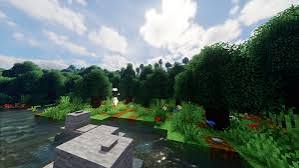
The reference landscape combines woodland, water and a visible stone edge. Notice how contrasting surfaces make the route easier to read against the foliage.
Vary the canopy in deliberate layers
Place larger trees as the main masses, smaller trees beside them, and lower bushes near selected edges. Leave occasional gaps where sky can show through. Similar-height crowns across the entire area often create a flat ceiling rather than a forest with depth.
Preserve the important sightlines
Stand at the entrance and look toward the destination. Trim any canopy that hides the first landmark. Repeat the check from the destination looking back; a route should make sense in both directions.
Design the ground as a connected surface
Use a restrained mix of path material, ordinary terrain and planted edges. Let the path bend for a reason, such as a large trunk or the edge of the pond. Repeated decorative blocks across every step can make a natural route look mechanically patterned.
Keep clearings genuinely open
A clearing needs enough quiet space to contrast with dense trees. Place accents along its perimeter and leave a usable central area. This gives the player a place to pause and allows nearby foliage shapes to stand out.
Plan for the actual client setup
Cosmetic foliage effects can change how dense your forest appears without changing where blocks are placed. Inspect the build with your visual mods enabled and then with a simpler setup. The underlying paths and structures should remain understandable for visitors whose visuals differ.
Check movement and performance together
Walk the full route after the first planting pass. Look for hidden changes in elevation, obstructed entrances and sections where dense foliage coincides with poor frame rate. Reduce local clutter before changing the entire mod configuration.
Inspect different lighting conditions
Test shade under the canopy as well as a bright clearing. If you use shaders, inspect the entrance at the settings you normally play with. A route that disappears into dark grass may need a material change or more open space rather than more decoration.
Complete one area before extending the forest
Finish a small section containing the route, a clearing and a few canopy layers. Use it as the style reference for the rest of the build. Repeating its principles with different tree spacing creates consistency without copying the same arrangement everywhere.