
Better Foliage Leaves: Create Fuller Canopies and Clearer Tree Shapes
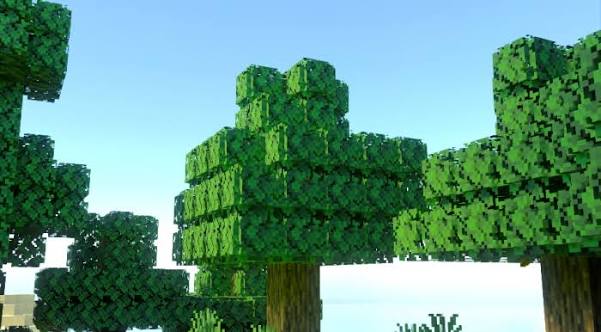
Better Foliage leaves are most noticeable at the outer edge of a canopy. Surface colors matter, but the silhouette determines whether a tree looks like a collection of cubes or a softer mass of greenery. Use a small comparison scene to judge that shape before adjusting your entire forest.
Compare leaves against a clear background
Build a leaf display
Place one leaf block from each tree species on a separate pedestal. Leave space around the blocks and view them against sky or a plain wall. Then place a few blocks together as a miniature canopy. This reveals whether an effect changes isolated edges, connected masses, or both.
The reference image shows tree crowns with detailed green edges. It is a composition reference; its exact textures and lighting may involve additional visual components.
Judge shape from several distances
Inspect the close view
Stand near the leaf display and look for missing textures, unusually harsh edges or obvious repetition. A visual effect that looks detailed close up may become noisy when repeated across hundreds of blocks.
Inspect the normal walking view
Step back until the display is about as far away as a tree beside your usual path. Rotate around it and compare the outline. The practical goal is a readable canopy with a consistent style, not the maximum amount of geometry in a single close-up.
Improve a tree build with spacing
Separate neighboring crowns enough to leave occasional sky openings. Mix small and larger trees while keeping trunks visible from important viewing angles. Fuller leaf shapes can amplify an already dense layout, so add detail after deciding where the clear spaces belong.
Keep deliberate edges around structures
Trim leaves near doorways, bridges and windows. A canopy can look attractive from outside while blocking the view from inside a house. Test both directions before filling the remaining gaps.
Diagnose leaves that still look flat
- Confirm that the foliage mod appears in the active instance's mod list.
- Test an ordinary vanilla leaf block without optional resource packs.
- Compare the scene with shaders disabled.
- Check your release's available leaf options or model behavior.
- Test a custom leaf separately before assuming it has built-in compatibility.
Avoid an automatic graphics-setting diagnosis
Minecraft graphics options may affect appearance, but a flat-looking canopy can also come from a pack override or unsupported custom block. Compare one variable at a time. Changing several menus at once can hide the actual reason an effect returned.
Balance canopy detail with forest usability
Walk a familiar path at ground level and look toward the densest section. Check frame rate, visibility and whether repeated leaf shapes distract from the build. Keep screenshots of your display alongside your settings so that future pack changes can be evaluated against a clear reference.