
Better Foliage Grass: Design Natural Ground Cover Without Clutter
Better Foliage grass can make a clearing feel richer, but attractive ground cover also depends on placement, color and open space. This resource focuses on building a convincing woodland floor while preserving the paths and sightlines that make the area usable.
Plan the ground before adding detail
Mark the main walking routes
Decide where a visitor enters, where they pause and which structure they should notice first. Keep those routes visible. Place your densest greenery beside trunks and along the edges of the clearing instead of filling every available block.
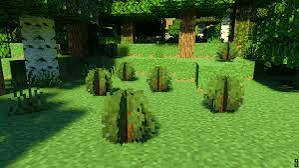
The reference image contains small clumps with gaps between them. That spacing is a useful design lesson even if your installed mod produces a different shape or density.
Use clusters rather than uniform coverage
Create a few larger patches, several smaller patches and some completely open ground. Repeat the same idea at different sizes so the clearing has a rhythm. Uniform spacing often looks planted, while controlled variation can suggest naturally uneven growth.
Transition toward paths and water
Reduce ground cover gradually near a path instead of ending it in a perfectly straight line. Around water, leave a few clear access points. These gaps make the scene easier to navigate and provide visual contrast for nearby planting.
Keep the palette consistent
Compare grass blocks, added vegetation and neighboring leaves under neutral lighting. A bright ground texture beside muted foliage can make the scene feel disconnected. Test another pack only after recording the original appearance; changing several textures at once makes color matching harder.
Distinguish visual grass from placed blocks
Cosmetic rendering does not automatically create harvestable vegetation or change terrain behavior. Decide which parts of your scene are actual placed plants and which are appearance changes. This matters when you want a build to look the same to visitors using another client setup.
Test the vegetation from player height
Walk the route through your clearing rather than inspecting it only from above. Look for hidden steps, entrances that blend into the grass, and objects that are difficult to recognize. Remove a few plants where needed; selective detail often improves the entire scene.
Check shadows as well as daylight
Ground cover can become visually dense under a canopy. Repeat the walk in shaded areas and, if you use shaders, at your usual lighting settings. A sunny screenshot is not enough to judge everyday readability.
Troubleshoot missing or inconsistent effects
Test an ordinary grass block in an empty scene. Remove optional resource packs temporarily and check which project and release you installed. Some visual changes depend on the available settings or model resources, and another mod's terrain block may not behave like vanilla grass.
Finish with a restrained detail pass
Add small accents near a fallen-looking log, a rock or the base of a tree, then stop and revisit the main route. The finished clearing should have both rich patches and resting space for the eye. Save a comparison image before your next texture or foliage update so the ground-cover style remains consistent.