

Better Foliage Waterfront Overview: Build Natural Ponds and Riverbanks
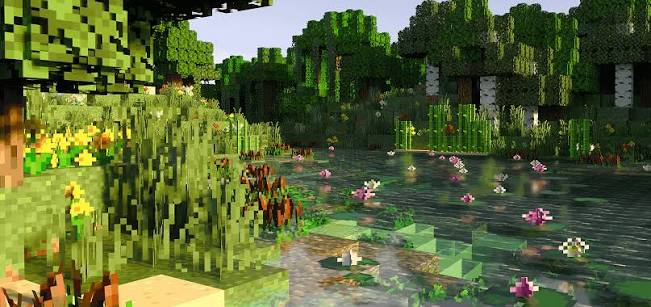
A Better Foliage waterfront looks convincing when the shoreline, vegetation and open water work together. The reference pond contains flowers and lush banks, but those details may come from several mods, packs or placed plants. Use it as a design reference rather than expecting one foliage installation to generate the same pond automatically.
Shape the shoreline before planting
Break up a straight bank
Create a few shallow inlets and small projecting corners. Vary the height of the surrounding land gently rather than repeating the same step around the entire pond. Keep one accessible edge where a player can stand and see the water clearly.
Avoid making every bank equally irregular. A simpler area gives the more detailed planting something to contrast against, and it can become a natural place for a bridge or seating spot.
Reserve areas of open water
Dense planting around every edge can turn a pond into an unreadable patch of green. Leave an open central surface and at least one clear view from the main path. Use plants to frame that view rather than block it.
Group accents along the bank
Place small clusters near a bend or beside a tree root. Separate them with quieter stretches of grass or sand. If your setup adds decorative effects near water, compare them with actual placed vegetation so the two layers do not compete.
Choose materials for the environment
A woodland pond can use muted soil and stone, while a beach-like bank may need broader areas of sand. Keep the palette consistent with nearby paths and structures. Test material transitions from player height; a pattern that looks tidy from above can appear striped from the bank.
Check the reflected scene
When using shaders, inspect both the plants and their reflections. Very bright water can pull attention away from the shoreline. Adjust the shader's documented settings only after the physical layout is clear, so lighting does not disguise a cluttered design.
Understand what the foliage mod changes
Visual improvements should not be assumed to add new water plants, change fluid behavior or create harvestable flowers. If you want a specific aquatic plant, verify which mod or block supplies it. Cosmetic details may also be visible only to clients using the same visual setup.
Test the pond as a usable location
- Walk around the entire bank and check that the main route remains obvious.
- Enter and leave the water at the intended access point.
- View the pond from the bridge or nearby structure.
- Inspect the scene without shaders to confirm the underlying layout works.
- Remove planting that blocks the most useful sightline.
Fix visual clutter with subtraction
If the pond lacks a focal point, remove one cluster before adding another. A clear stretch of water beside a detailed bank often produces a stronger composition than uniform decoration around the whole perimeter.
Finish with a consistent viewing angle
Choose the main approach to the pond and make the opposite bank your background. Keep taller planting at the sides and smaller accents near the foreground. The resulting waterfront should remain readable during ordinary exploration as well as in a carefully lit screenshot.